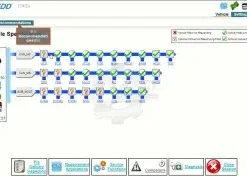
Before you invest in JLR SDD diagnostic software, it is essential to ensure your laptop or PC meets the correct specifications. Running SDD on underpowered or incompatible hardware leads to slow operation, communication timeouts, and in the worst case, failed programming sessions that can damage vehicle modules. This guide covers every aspect of JLR SDD system requirements, from the operating system and processor to the USB ports and internet connection, so you can build a reliable workshop setup from day one.
Windows Operating System Requirements
JLR SDD is designed to run on Microsoft Windows. The officially supported versions are Windows 7 Service Pack 1 (64-bit) and Windows 10 Pro (64-bit). While SDD will technically install on some other versions, using anything outside the supported range increases the risk of driver conflicts, Java runtime errors, and unstable VCI communication.
Windows 7 remains viable for SDD, but it is no longer recommended for new installations. Microsoft ended extended support for Windows 7, which means security updates are no longer provided. For a workshop environment where the laptop may be connected to customer vehicles and occasionally to the internet, running an unsupported operating system is a security risk. If you already have a Windows 7 laptop dedicated to diagnostics, it will continue to work, but we advise planning an upgrade to Windows 10.
Windows 10 Pro 64-bit is the current standard for JLR SDD installations. The Pro edition is preferred over Home because it includes features such as Remote Desktop and advanced driver management that are useful for workshop support scenarios. Windows 11 is not officially supported by JLR for SDD, and while some users have reported success, we do not recommend it for production workshop use. The Java dependencies and legacy drivers in SDD were written for Windows 10 and earlier architectures, and Windows 11 compatibility is not guaranteed.
Regardless of which Windows version you use, ensure it is fully updated with the latest service packs and cumulative updates before installing SDD. Missing system updates are a common cause of installation failures, particularly for the Visual C++ redistributables and .NET Framework components that SDD relies upon.
RAM and Processor Requirements
The minimum RAM requirement for JLR SDD is 4 GB. This is sufficient for the software to launch and perform basic diagnostic tasks on a lightly loaded system. However, the minimum specification is not the recommended specification, and in practice, 4 GB of RAM leads to sluggish performance when running multiple applications or when SDD is searching through large calibration databases.
We strongly recommend 8 GB of RAM as the practical minimum for a workshop diagnostic laptop. With 8 GB, SDD can run comfortably alongside a web browser, a PDF manual, and a remote support session such as TeamViewer or AnyDesk. This multitasking capability is important for technicians who need to reference technical documentation while diagnosing a vehicle.
For workshops running both SDD and Pathfinder on the same machine, or those using virtual machines to separate software environments, 16 GB of RAM is the ideal configuration. This headroom ensures smooth operation regardless of workload and future-proofs the laptop for additional software.
The processor requirement is relatively modest by modern standards. An Intel Core i3 or equivalent AMD processor is the minimum. An Intel Core i5 or i7 from the last five generations provides excellent performance for SDD and related applications. Processor speed is particularly noticeable during calibration searches and when loading large vehicle databases, so a newer processor with fast single-core performance is beneficial.
Disk Space and Storage Recommendations
JLR SDD requires a minimum of 40 GB of free disk space for the base installation, calibration files, and operating system overhead. In practice, we recommend allocating at least 80 GB to the SDD partition or laptop to allow room for updates, additional vehicle data, and diagnostic logs that accumulate over time.
The type of storage matters significantly more than the total capacity. A Solid State Drive (SSD) is strongly recommended over a traditional Hard Disk Drive (HDD). SDD performs frequent read and write operations when searching calibration databases, loading vehicle configurations, and logging diagnostic data. An SSD reduces these operations from several seconds to near-instantaneous, which improves the overall user experience and reduces the risk of communication timeouts during programming.
If you are using a dedicated diagnostic laptop, we recommend a 256 GB SSD as the minimum. This provides ample space for SDD, Pathfinder, CCF Editor, and related tools, with room to grow. For workshops using a single laptop for all JLR software, a 512 GB SSD is the safer choice.
USB Ports and Connectivity
JLR SDD communicates with the vehicle through a J2534-compatible VCI interface connected via USB. The software requires at least one USB 2.0 or USB 3.0 port. Most modern laptops have only USB 3.0 or USB-C ports, which is generally fine as J2534 interfaces are backwards compatible with USB 3.0 controllers.
However, some older VCI devices and drivers can be sensitive to USB 3.0 power management features. If you experience intermittent communication errors, try the following steps: disable USB selective suspend in Windows power settings, use a different USB port, or connect through a powered USB 2.0 hub. These simple adjustments resolve the majority of USB-related connection issues.
We recommend having at least two USB ports available on your diagnostic laptop. One port is used for the VCI interface, and the second is useful for USB drives, external backup storage, or a wireless mouse. If your laptop has only USB-C ports, invest in a high-quality USB-C to USB-A adapter or docking station from a reputable manufacturer.
Internet Connection Requirements
While JLR SDD offline programming allows you to perform many tasks without an internet connection, certain functions require online access. Software activation, licence validation, and calibration updates all need a broadband connection. We recommend a minimum download speed of 2 Mbps for these tasks, with 10 Mbps or higher being ideal for downloading large calibration packages.
Some security-related programming functions and the latest technical bulletins are only available through Jaguar Land Rover's online services. Workshops that need full online capability should pair SDD with a JLR TOPIX Cloud Online Access. If you plan to perform online programming regularly, a stable and reasonably fast internet connection is essential. Mobile broadband or tethered connections can work in a pinch, but wired broadband is more reliable for extended programming sessions.
Recommended Laptops for JLR SDD
Choosing the right laptop for JLR SDD depends on your budget, working environment, and whether the machine will be used exclusively for diagnostics or also for general workshop tasks. Here are our recommendations across three categories.
Budget Option: Any modern Windows 10 laptop with an Intel Core i3, 8 GB RAM, and a 256 GB SSD will run SDD adequately. Look for models with at least one USB 3.0 port and a 1920 x 1080 display. Brands such as Lenovo, Dell, and HP offer reliable business-grade laptops in this category. Expect to spend between £400 and £600 for a new machine.
Workshop Standard: For daily workshop use, we recommend a business-grade laptop with an Intel Core i5, 16 GB RAM, and a 512 GB SSD. Models such as the Lenovo ThinkPad T series, Dell Latitude 5000 series, or HP ProBook 600 series are built to withstand workshop conditions and offer excellent driver compatibility. Budget £700 to £1,000 for this tier.
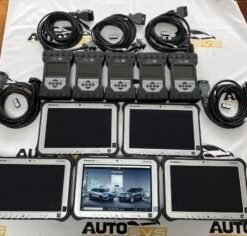
Rugged Specialist: For mobile technicians or workshops where the laptop will be exposed to dust, vibration, and temperature extremes, the 2022 Pathfinder System Panasonic FZ-G1 i5 6300 with JLR DOIP VCI WF is the industry standard. These machines are built to military specifications, have excellent port selection, and are designed for automotive environments. At SX-CAN, we offer the Toughbook CF-54 pre-configured with JLR SDD, Pathfinder, and all required drivers. This is the ultimate ready-to-work solution.
Mongoose JLR Cable Specifications
The Mongoose JLR cable is the most widely used J2534 interface for SDD. It is a pass-thru device manufactured by Drew Technologies and designed specifically for Jaguar Land Rover diagnostics. Understanding its specifications helps you choose the right cable and troubleshoot connection issues.
The Mongoose JLR supports both CAN and K-Line protocols, which covers the full range of JLR vehicles from 2005 to 2016. It is a USB 2.0 device with a standard J1962 OBD-II connector. The cable length is approximately 1.5 metres, which is sufficient for most workshop layouts. The device draws power from the USB port and does not require an external power supply, making it highly portable for mobile technicians.
Driver installation is straightforward. The Drew Technologies driver package includes the J2534 driver and a configuration utility that allows you to test the device without SDD running. We always recommend testing the interface in this utility before launching SDD for the first time. If the utility can communicate with the device, SDD will almost certainly work correctly.
The Mongoose JLR cable is not compatible with DoIP vehicles. If you plan to work on 2017+ models, you will need a DA-DoIP VCI D-PDU J2534 PassThru or JLR DoIP VCI in addition to the Mongoose cable. Many workshops start with the Mongoose for SDD work and add a DoIP interface later when they expand into newer vehicles.
J2534 Interface Requirements
J2534 is the Society of Automotive Engineers standard that defines how a pass-thru device communicates with vehicle controllers. JLR SDD requires a J2534-compatible interface to establish the connection between your laptop and the vehicle's diagnostic network.
Not all J2534 interfaces are equal. Cheap generic cables often lack the firmware quality and driver support needed for reliable programming. A failed programming session due to a poor-quality interface can corrupt a module, resulting in repair costs far exceeding the price of a proper cable. We strongly recommend investing in a genuine Mongoose JLR cable or a proven aftermarket equivalent from a reputable supplier.
When selecting a J2534 interface, verify that it explicitly lists JLR SDD compatibility in its specifications. The device should support CAN bus at 500 kbps and 250 kbps, which are the speeds used by JLR vehicles. It should also support the J2534-1 protocol, which is the standard for pass-thru programming. Some advanced interfaces support J2534-2 extensions, but these are not required for SDD operation.
Virtual Machine Compatibility
Many workshops prefer to run JLR SDD inside a virtual machine (VM) to isolate it from their main operating system and avoid driver conflicts with other diagnostic software. This approach works well, provided the VM is configured correctly.
VMware Workstation and Oracle VirtualBox are the most commonly used platforms for running SDD in a VM. We recommend allocating at least 4 GB of RAM and 60 GB of disk space to the VM. The VM should run Windows 10 Pro 64-bit, just like a physical machine. USB passthrough must be enabled so the VM can access the J2534 interface directly. This is usually the trickiest part of VM setup, and it varies depending on the hypervisor and host operating system.
One important caveat: some J2534 drivers have poor USB passthrough support. If you experience communication errors inside a VM that do not occur on a physical machine, the issue is likely the USB passthrough layer rather than SDD itself. In these cases, a dedicated physical laptop may be more reliable than a VM. Our remote support team can help troubleshoot VM configuration issues if you choose this route.
Conclusion
Meeting the correct JLR SDD system requirements is the foundation of a reliable diagnostic setup. A Windows 10 Pro laptop with 8 GB of RAM, an SSD, and a genuine Mongoose JLR cable provides everything you need for smooth, trouble-free operation. Spending a little more on quality hardware upfront saves considerable time, frustration, and potential module damage down the line.
At SX-CAN, we supply not only the JLR SDD Jaguar Land Rover Diagnostic and Jaguar Landrover VCI interface for SDD, but also pre-configured laptops and complete diagnostic kits that take the guesswork out of hardware selection. Whether you are building your first workshop setup or upgrading an existing one, our team can advise on the best configuration for your specific needs and budget.